Announcing ToneTech, a terminal pedalboard with an AI guitar tech
Real-time guitar effects in your terminal, and a Claude agent in the side pane that turns "less fizz, more Gilmour" into actual knob moves. It listens before it tweaks, and every change can be undone.
For the last couple of months I’ve been building my guitar effects into a real tool. Today it gets a name: ToneTech, a pedalboard that runs in your terminal, with an AI guitar tech sitting next to it. It’s open source (MIT), and the code is on GitHub: github.com/Techblogogy/tonetech.
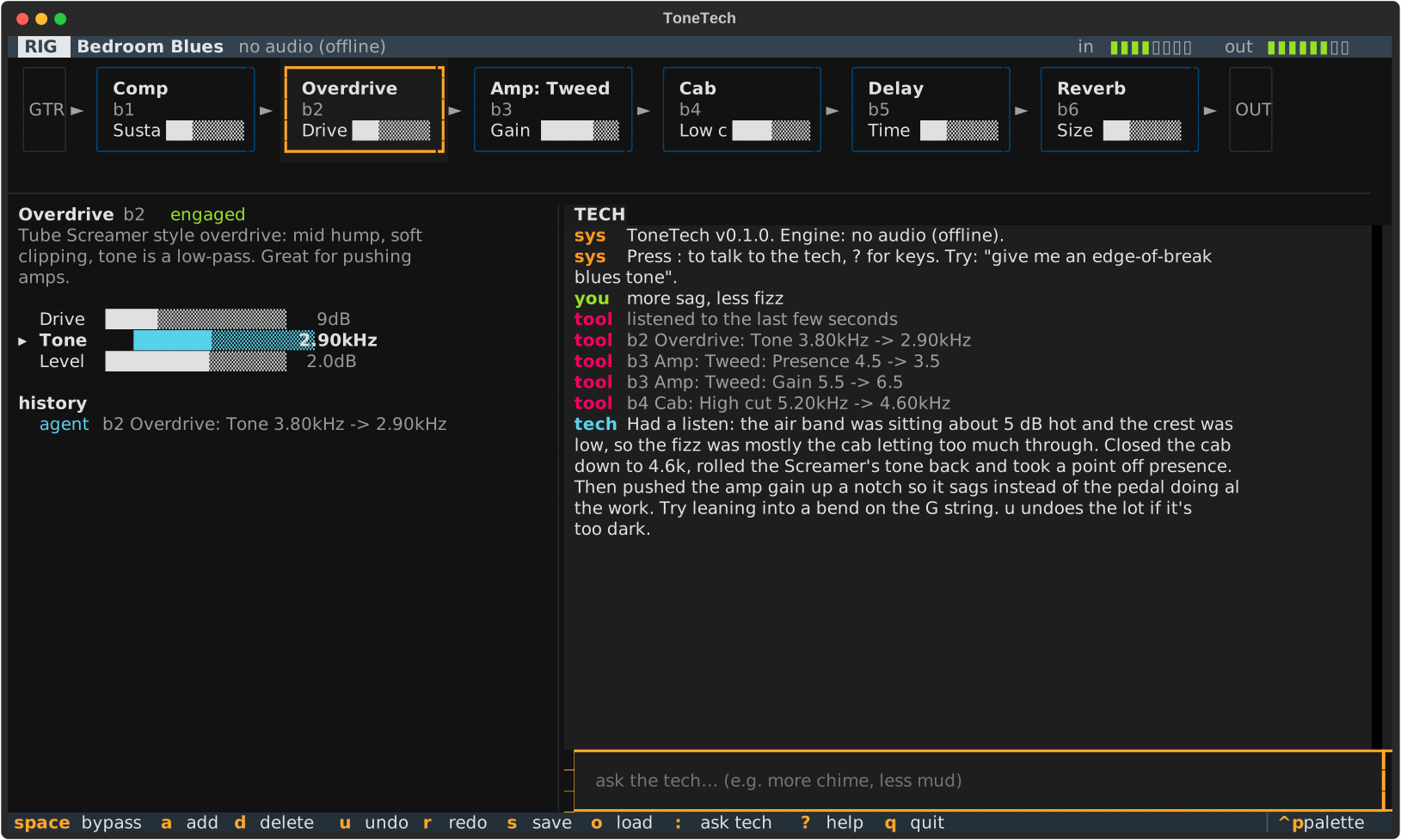
What it does
You plug in a guitar, run tonetech, and get a live signal chain: gate, compressor, drives, amps,
cab, EQ, modulation, delay, reverb. Everything is keyboard-driven: h/l turn a knob, space
bypasses a block, a adds one, [/] move it along the chain, u undoes.
Press : and you’re talking to the tech. You describe what you want the way guitarists actually
talk:
You: this is too fizzy and I want it to sound more like a Gilmour solo
Tech: Listened to the last few seconds: lots of energy above 6 kHz and not much sustain. I pulled the cab’s high cut down to 4.8k, swapped the distortion for fuzz into the clean amp, and added a long dark delay. Try some slow bends up at the 12th fret. Hit
uif it’s too much.
It comes with five factory presets. Here are three of them on the same test riff:
The design decision that matters: the agent never touches audio
The easy version of this would let a model write DSP code or poke the audio engine directly. That’s how you get a feedback shriek at full volume in someone’s headphones. ToneTech separates them strictly:
 you ──► tech (Claude) ──► apply_patch(ops) ──► validate ──► rig state ──► audio engine
                 ▲                                                            │
                 └──────────── analyze_input (spectrum of the last N seconds) ◄┘
The tech has six tools: get_rig, apply_patch, analyze_input, list_rigs, save_rig and
load_rig. Every change goes through apply_patch, which takes a list of small JSON operations:
{
  "why": "tame the fizz and add a long dark delay",
  "ops": [
    { "op": "set", "block": "b4", "param": "high_cut", "real": 4800 },
    { "op": "add", "kind": "delay", "params": { "mix": 0.3 } },
    { "op": "set", "block": "b2", "param": "drive", "delta": -0.1 }
  ]
}
The patch is applied to a copy of the rig, and only committed if every op validates. Unknown
block kinds, missing parameters and NaN all fail with a clear error the model can read and fix. Values
are clamped to the knob’s range. A safety limiter sits at the end of every chain. And every patch
lands in the undo history tagged with its source and the why, so one keypress rolls back whatever the AI did.
The knobs themselves are a good interface for a model. Each one is stored as 0–1 but has real units
and a curve, so the model can say "real": 4800 when it thinks in Hz, or "delta": -0.1 when it
thinks “a bit less”.
It listens before it tweaks
“Muddy”, “fizzy” and “boxy” mean something to guitarists but nothing to a language model on its own.
So the engine keeps a ring buffer of the last few seconds of output, and the analyze_input tool
turns it into measurements the model can reason about:
- RMS and peak level, and crest factor (how compressed it is)
- spectral centroid, a rough measure of how bright it sounds
- energy per band, relative to the average
- plain words derived from those numbers: muddy when the lows and low mids both stick out, boxy when it’s just the low mids, fizzy when there’s too much above 6 kHz, compressed when the crest factor is small
The system prompt tells the tech to call it before acting on any word like that, and to ground its explanation in what it measured. That one rule made the suggestions go from generic to useful.
Under the hood
- Python 3.10+, Textual for the terminal UI, Spotify’s pedalboard for the DSP primitives, and the Anthropic SDK for the tech.
- Its own audio loop, with 256-sample buffers at 48 kHz by default, live metering, and knob moves applied without rebuilding the chain. Structural changes swap in a new chain at a buffer boundary.
- 16 block types, each a small recipe of filters and nonlinearities: Tube Screamer-style overdrive, RAT-style distortion, fuzz, four amp voices, a cab, EQ, chorus, phaser, delay, reverb.
- 48 tests, covering the catalog, patch validation, the engine, analysis, the agent loop (against a fake client) and the app itself.
Try it
The source, issues and install instructions are at github.com/Techblogogy/tonetech.
pipx install git+https://github.com/Techblogogy/tonetech
tonetech --devices          # find your audio interface
tonetech --input "Your Interface" --rig "Plexi Crunch"
You’ll need an ANTHROPIC_API_KEY for the tech. Everything else works without one.
What’s next
Tremolo and pitch effects, loading real cabinet impulse responses, and letting the tech compare two versions of a rig A/B style, by ear and by numbers. If you play and try it, I’d love to hear what the tech gets wrong. That’s the most useful feedback.